|
Tessellations by Rotation Around the Vertices
Polygons that can be used:
Any square or regular hexagon
Symmetry:
Translational symmetry
4 or 3 pt. Rotational symmetry
Technique:
1) Draw your beginning polygon. For an example of this tessellation, a hexagon will be used as shown in Figure 1.
2) Use the pencil to draw a line design from one vertex to another along the top (Figure 1).
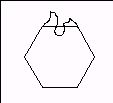
Figure 1
3) “Lasso” the line design to select it. Copy it and paste a copy. In
TRANSFORMATIONS, rotate the copy a POSITIVE 90 (square) or 120 (hexagon) degrees. Move the copy so it lines up with the side to the left (see Figure 2).
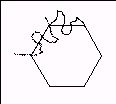
Figure 2
4) Repeat steps 2 and 3 for the bottom/right (square) or lower left/bottom and lower
right/upper right (hexagon) side pairs, until your piece is done (Figure 3).
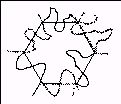
Figure 3
5) Erase the lines of your original polygon (in this case, the hexagon) and any other extra lines so only your design can be seen. You now have a tessellating
piece. Add any details with pencil at this time. You may paint the figure now, or
wait until you are done tessellating to paint the figure different colors (Figure 4).
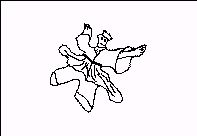
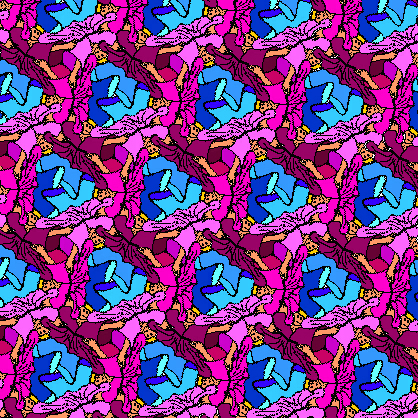
Figure 4: Ballet dancer as a king
6) “Lasso” your entire piece to select it. Copy it and paste a copy. In
TRANSFORMATIONS rotate the copy a NEGATIVE 90 (square) or 120 (hexagon) degrees, and fit it to the original like a puzzle piece. Paste another copy and rotate
it a NEGATIVE 180 (square) or 240 (hexagon) degrees, and fit it to the original like
a puzzle. (If you have a square, paste another copy, and rotate it a NEGATIVE 270
and fit it in.) You should have a quartet (square) or triplet (hexagon, see Figure
5) of pieces (which you may wish to color differently at this point). Copy and paste this
whole set to fill up the screen (no more rotating). (To get pieces to fit off the sides
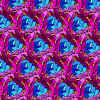
you may need to pick up the piece near its sides.) See completed tessellation.
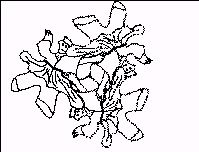
Figure 5: Triplet (hexagon base)
|